Showing posts with label Beyond PowerPoint. Show all posts

Wednesday, 18 May 2011

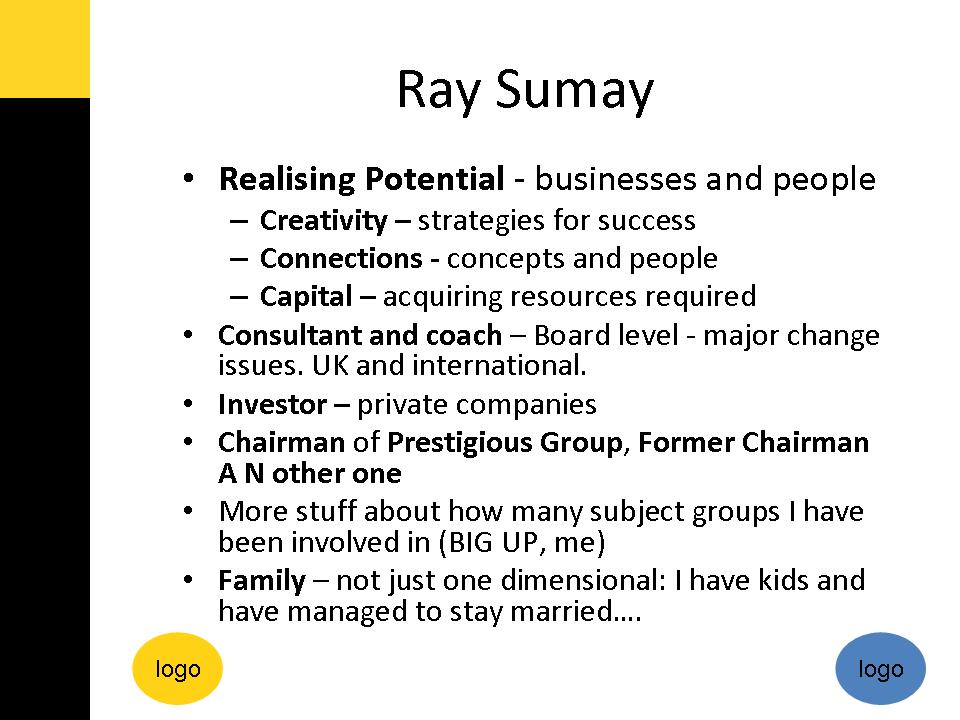
PowerPoint Slide Design Lesson #3

Your slides are not your resume nor your CV. 
Establishing your credibility at a presentation is not about telling them what you have done and how important you are.  Your presentation is not about you at all.

It is all about your audience

You will be credible if you
  • connect with your audience
  • demonstrate you understand their needs and their challenges, and 
  • give them practical solutions to their problems.  
Make their life better and you will gain all the credibility and respect that a slide like this simply will not.

this is a genuine example from a recent presentation in the UK by a corporate coach.  I have removed personal details and the corporate logos to maintain their anonymity.

Monday, 9 March 2009

How to Remember What to Say

As a presenter you want to remember what to say during your presentation or workshop. The more nervous you are, the more you may want to use extensive notes, or even a script to make sure you remember it all. But please put the script down if you really want to connect to your audience.

There are only two occasions when reading off a script is acceptable:
1) If you are a political or business leader such as President Obama
2) If every single word or nuance must be spoken exactly as written

The rest of the time, it is far better to be spontaneous and ad-lib. Here's why:
* Your tone and pace will be more natural
* You will have more eye contact and connection with your audience
* Your personality and natural charisma will shine through

The problem with a script is that it is rarely written in words or phrases that you would use naturally when speaking. Sentences are too long. By reading it out you may stutter or sound stilted, never mind lose your place as you talk.

One of the worst solutions is to write a series of PowerPoint slides with bullet points on to remind you what to say. Sure, lots of people do it, that doesn't mean it's a great idea.

These are some great options to help remember what to say:
* Use brief notes on A5 paper, or blank cards - just a few reminders will do
* Create a brief plan of what to say and when (with times to ensure you stick to your timings)
* Practise, practise, practise until you know what you need to say and can say it in the time allowed, without any reference to notes at all. The sooner you start practising each element of the presentation, the more confident you will be when push comes to shove.

A passionate, authentic delivery of any information is better than a stilted script-driven reading without eye contact. So go on, put the script down and back away from the podium.....

Monday, 12 January 2009

Decluttering Your Message

The New Year is a great place to start putting some new habits into practice, so let us have a little clear out - or in some cases a really big clear out....

Let us start by decluttering your message.
Many of you will have heard of the 80/20 or Pareto rule...

Well the same applies in presentations and workshops: 80% of your impact will come from just 20% of your message,

So now is the time to declutter your message so that you get clear about the 80% that really makes a difference. Using the Pareto rule, mandatory training could be cut to 20% of the time it usually takes by cutting to the chase.

Using Post-It notes, write down all the key things you normally say in your presentation (that last a few minutes at least). Count the notes and work on getting down to one-fifth or 20% of that number.

There are two rules now for dealing with each note: Ditch It or Do It.

If you feel it falls into the 80%, ditch it.
If you feel it falls into the 20%, keep it and keep doing it.

This is a great method for getting clear about what you should be saying and what you pretty much can leave out with very little detriment to your listeners....

Now you have something sleek and elegant - and can design some interactive exercises that reiterate your core message, rather than adding in non-core fluff.

Keep an eye out for part 2, where I will talk about decluttering your materials.

Go the 2nd December 2008 to find out more about the NEED TO KNOW basis for content design.

Friday, 21 November 2008

Presentation Visuals

This week I have been putting into practice and experimenting with new approaches to presentations and the design of PowerPoint (or Keynote) slides... Whilst I know that you can create workshops and presentations without ever touching a computer (and sometimes they are all the better for it), I know that PowerPoint is embedded within the cultural mindset.

So I feel that if you are going to use slides, they had better be brilliant and enhance what you are saying rather than repeating it (and hence distracting the audience's attention, see yesterday's blog)....

PowerPoint itself does not exactly help you to design great slides - it contains ghastly templates that encourage gruesome colour combinations that are way too busy, with a whole host of bullets or text over the top. Whatever you do, please leave all that alone.

The most important approach is one that says: less is more.
There are three key questions to ask yourself about each visual that you use:

1) Is it simple? Can anyone understand the point you are trying to make easily? That means that large amounts of text or data or points on graph or images are out. Think one key point per slide.

2) Is it beautiful? Does anyone want to look at ugly or cluttered images, clipart or fonts? Why not strive for a beautiful image that people will want to look at?

3) Does it add to what I am saying? The images should be a powerful way of enhancing what you are saying, focussing in on key messages that you want your audience to remember.

Step away from the PowerPoint templates and backgrounds.
Step away from bullet pointed lists.
Step away from clipart.

Embrace full slide photographs.
Create your own simple graphs and diagrams (or even better get a designer to do it).

Thursday, 20 November 2008

Making PowerPoint Powerful

Where are people going wrong when they design slides that result in the muttered phrase "Death by PowerPoint"?

There are two basic mistakes:

Mistake 1 - Designing Slides as Handouts.If you have enough information on your slides for them to work as handouts, then your slides are wrong. Why not simply print out the slides and circulate them, instead of becoming the voice in your audience's heads as they read them?
These slides are Death by text.

Mistake 2 - Designing Slides as an Autocue.The next mistake, is to design your slides to help remind you what to say. Your audience will still read your slides, as you fill in some extra gaps.
These slides are Death by Bullet Point.

Research has proven that it is more difficult to process information if it is coming at your both verbally and in written form at the same time.

So your audience should not be both listening to you and either reading handouts or reading slides. If they are, then they will be doing neither well.

The point of slides is that they provide a strong visual backdrop to complement your words, with the audience focussing on listening to you, your passion and knowledge. They are the stills and you are the narrator.

To avoid these mistakes, you must design your slides, your prompts and your handouts as separate items. You can use PowerPoint for all three, but they are likely to be separate files not the same one.

Next time you are designing a presentation, see if you can think of the slides as a visually exciting film, which you are narrating.

Monday, 3 November 2008

The Power of Passion

I watched an incredible speech over the weekend, by a 12 year old girl.
She spoke with simple phrases to an audience at the United Nations.

This would daunt even the most extrovert presenters, yet she spoke calmly without a hint of nerves.
What is most extraordinary about her short 6 minutes is the strength of her passion.

She talks about flighting for her future, and how it is not like losing an election or a few points on the stock market. She pleas for us to stock breaking things we cannot fix (like a desert that was once a forest). She asks us why we are so greedy, why we cannot share. Simple questions that perhaps we forget to ask anymore.

Watch this and learn how to write a great speech that could also silence the world.

Watch it by following this link:
http://uk.youtube.com/watch?v=TQmz6Rbpnu0

The video is rightly entitled: The Girl Who Silenced The World.

Thursday, 16 October 2008

Yawnbuster - great idea, wrong solution

Today I read with a mixture of astonishment and horror about a new product that has been launched called Yawnbuster (visit www.yawnbuster.com to find out more)....

This product (costing several hundred dollars) is designed to help create a more interactive learning environment. They have (rightly) recognised that some presentations can bore for [insert country where you live]. But they have (wrongly) decided to design some add-in facilities so that you can use PowerPoint to run quizzes/ polls and so forth.

The principle is sound. People do need to interact with information, share their experiences, discuss and debate approaches to certain situations, and generally get involved.

But is reading more colourful images from a projector really the way to add variety and interaction. The most jaw dropping option is the "Show of Hands". For goodness sake!

When did you need a slideshow add-in to get people to put their hands in the air?
For me, that is time completely wasted on pointless pretty technology, which should be spent thinking about what your learners need.

I despair sometimes that trainers are like technological magpies - looking for the newest, shiniest answer to their problems, instead of looking to themselves for the answer.

Great training does not need any of this stuff.
It doesn't need technology.

It needs passion, enthusiasm.
It needs someone who cares about their topic and wants with all their hearts to pass that onto other people.
It needs consideration for your learners, for where they are, what they know and what they really NEED TO KNOW.

Step away from the computer.
Put the mouse down, slowly, on the floor.
Raise your hands up, tie them behind your back, and now design your training event.
Hands-free.

email me at emma@lightthespark.co.uk for a copy of my free ebook "Beyond PowerPoint".

Wednesday, 1 October 2008

Beyond PowerPoint

Today I have been pulling together some tips on Beyond PowerPoint. In mentioning creative training and the need to avoid PowerPoint, one person reacted by saying "I'd be interested to see what she does instead"....

Are we really so wedded to this software that we cannot think of anything else?
Do we really believe that the best way for people to learn is to absorb facts and information through their eyeballs?

So here are my suggestions when it comes to taking your training Beyond PowerPoint:

* firstly aim only to cover NEED TO KNOW information. Think about this in advance and you may find that your event is substantially reduced. The best trainers are ruthless editors.
* next get your learners to tell you what they need to know about the topic. Use a cocktail party style icebreaker where everyone stands up and when they meet someone else, shares one thing they would like to learn from the session. Combining all these at the end on a flipchart gives you a great focus for your session.
* next find out what people already know about your topic. So ask small group of around 3-4 people to brainstorm things that they know (perhaps about specific elements) and to write these on a flipchart. You may be amazed at how much they already know - one person within a group might know quite alot and they will have already taught their colleagues, and by asking each group to summarise their flipchart, they teach the rest of the class. Anything that is inaccurate or wrong, please correct at this point and add key missing items to.

Now you have a clear focus for your event and you haven't even touched your projector.

When it comes to covering the information that bridges the gap between you have a number of alternative options:

* Card Exercises. Here small groups (2-3) are given a set of cards with words or phrases on them. They then have to either put them into some sort of order (first to last, most important to least important) or categorise them (true/ false). Even with little prior knowledge of a topic, people will start thinking, discussing and will do most of this without help. You can then coach them on a few cards they are unsure about. This is a powerful way to interact with information and works for a wide range of topics.

* Case Studies. You provide some scenario or case study for small groups to discuss. If need be, you can also give them some summary information, books or reference material, where they can search for further help. This helps people get to grips with what they already know or don't know and you can provide the information or skills they need to improve dramatically.

* Stories. Find someone who has a powerful, emotive story relating to your topic. If you cannot actually invite them to the session, then video their story. Imagine the power of someone who has your widget keeping them alive in their artificial heart to inspire your technicians to tighter manufacturing tolerances. Imagine the impact from a mother who has lost a child to gang violence.

* Quizzes. By setting simple or complex questions, you can test and evaluate what people know. By providing clear answers, you can teach them a whole range of vital information. Quizzes are very flexible and you can ask questions aloud (preferred as you can alter the questions to suit your learners on the day), and then ask teams to hold up cards with their answer, move to somewhere in the room based on a multiple choice answer (a, b or c for instance) or write their answer down.

Here I have shared just a few techniques to help you go Beyond PowerPoint. I hope you are inspired the next time you are designing some training to step back from the keyboard, and write some cards, or a quiz and a case study, to inspire your learners in new ways.